Guide
Requests
On this page
Friends and family can find movies and series and request them, in the web interface or on Discord. You approve a request (or StreamZH does it by itself), and StreamZH adds the title, downloads it and tells the requester once it can be watched. This replaces Requestrr and similar request apps.
Who may request what depends on the role: every role can use Discover and request; Requesters see only Discover, their requests and their profile.
Discover#
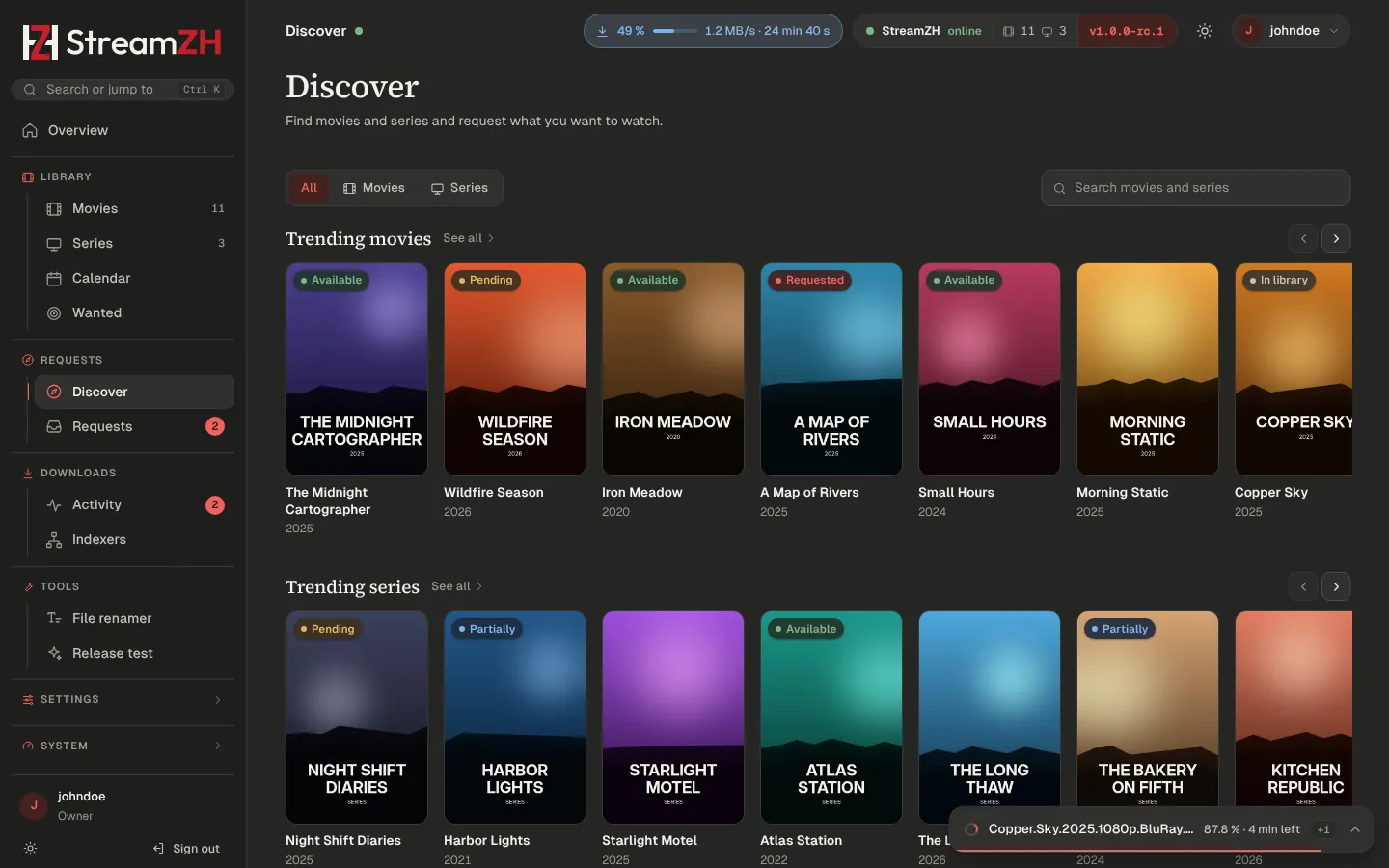
Discover (sidebar, Requests group) shows rows from TMDB: trending, popular, upcoming and top rated movies and series, and a search. Each title shows its state: Available, Partially (some episodes), Pending (waiting for approval), Requested (approved, StreamZH looks for it) or In library. Open a title for details and Request; for a series, choose the seasons. A note for the admins (for example the language you want) is optional.
The header shows how many requests you have left this period when limits apply.
Requests page#
Requests lists what was requested and where it stands. Admins see everyone's requests and approve or decline them (with an optional reason the requester sees), or approve with another profile or folder. Users see their own requests and can cancel pending ones. A badge in the sidebar counts requests waiting for approval.
While the side-by-side mode is on, approved requests are added and monitored, but StreamZH grabs nothing until you switch over.
Settings → Requests#
| Setting | Default | Meaning |
|---|---|---|
| Requests | on | Off: Discover still works, but nobody can request; open requests stay |
| Approve friends automatically | on | Requests from Friends go straight to the library. Per user in Settings → Users |
| Approve requesters automatically | off | Off: an admin approves every request from a Requester |
| Search on approve (Advanced) | on | Look for an approved title right away. Off: it waits for RSS and the automatic search |
| Notify when available (Advanced) | on | Tell the requester (Discord, notifications) once the title can be watched |
| Limits: Movies, Series, Period | no limit, 7 days | How many requests a user may make in the period. Per user in Settings → Users |
| Adding approved titles (Advanced) | Quality profile and root folder for approved movies and series (default profile, first root folder), and which seasons of a requested series are monitored: only the requested ones, all, or requested and future seasons |
A title that is already in the library keeps its profile and folder; StreamZH only monitors what was requested.
Request events (created, approved, declined, available) can be sent to any notification service of Connect; they are off by default per connection.
Discord bot#
Settings → Discord runs a Discord bot inside StreamZH: friends use /movie <title> and /tv <title> to search
and request, /requests to see where their requests stand, /link <code> to link their StreamZH account and
/help. The bot tells them when something is ready.
Set it up#
- Open the Discord Developer Portal → New Application (any name, e.g. "StreamZH") → Bot → Reset Token, and paste the token into Bot token. No privileged intents are needed.
- Switch Discord bot on and save. The bot connects; the page shows its state.
- Add to a server opens Discord to invite the bot with the permissions it needs (view channels, send messages, embed links, slash commands).
- Optionally limit it to some Servers and Request channels.
Linking accounts#
A linked Discord user requests as their StreamZH account (with its role, auto-approve and limits). In StreamZH:
Profile → Discord → Create code, then /link CODE in Discord. The code works once, for 10 minutes.
Bot settings#
| Setting | Meaning |
|---|---|
| Unlinked Discord users (Advanced) | Members without a StreamZH account may request too; their requests always wait for an admin |
| Required role (Advanced) | Unlinked users need one of these roles. Empty: every member |
| Direct messages (Advanced) | The request commands also work in a private chat with the bot (only when no servers are listed) |
| Message the requester (Advanced) | News about a request go to the person who asked as a direct message from the bot |
| Notify channel (Advanced) | Also post to this channel and mention the requester |
| Commands (Advanced) | Names of the movie and series commands (empty switches one off), how seasons are requested (choose seasons, one season per request, whole series only), the bot's status text |
Import from Requestrr reads Requestrr's settings.json (channels, roles, commands, and optionally the bot token;
stop Requestrr first, two programs with one token both answer every command). Nothing is saved before you confirm
the preview.