Guide
Downloads
On this page
A grabbed release goes to a download client:
- Usenet (NZB from Newznab indexers): StreamZH's built-in Usenet engine downloads it from your Usenet servers, repairs it with par2 and unpacks it with 7-Zip, like SABnzbd. Alternatively a blackhole folder hands the NZB to SABnzbd or NZBGet.
- Torrents (from Torznab indexers): the built-in torrent engine, or qBittorrent, Transmission or Deluge.
Finished downloads are imported: moved (Usenet) or hard-linked/copied (torrents, so seeding goes on) into the library and renamed. Settings → Download clients shows all of this on one page.
Usenet servers#
Settings → Usenet servers → Add server: the news server of your Usenet provider.
| Field | Meaning |
|---|---|
| Name | Shown in the status and the log, e.g. the provider's name |
| Host | The news server address from your provider, without nntp:// and without the port |
| SSL, Port | Encrypts the connection (recommended); usually port 563 with SSL, 119 without |
| User name, Password | From your provider account. The password is stored encrypted and never shown again |
| Connections | How many your plan allows (often 20 to 50). More only help up to the speed of your line |
| Priority (Advanced) | 0 is the primary server, asked first. Backup servers (1 to 99), such as a block account, are only asked for articles the servers before them do not have |
| Retention (Advanced) | Days the server keeps articles; older posts are not requested from it. 0 if you do not know |
| Timeout (Advanced) | How long StreamZH waits for an answer (10 to 300 seconds) |
| Certificate check (Advanced) | Strict (recommended), Minimal (a self-signed or expired certificate is accepted, but it must be issued for this host), Off (unsafe) |
| Articles per request (Advanced) | Pipelining, 1 to 20: how many articles are asked for on one connection before the first arrives. 1 is the safe choice |
| On failure (Advanced) | Skip the server for a few minutes; Required: pause downloads while it cannot be used (for your main provider); Optional: skip it longer, without notices (for an unreliable extra server) |
| Account expires (Advanced) | The status window reminds you 5 days before and up to 5 days after |
| Quota (Advanced) | For block accounts and plans with a download limit; once used up, the server is skipped |
| Notes | Only for you |
Test connects and logs in. Running Radarr/Sonarr with SABnzbd? Remember that both share your provider's connection limit while they run side by side (Migration).
Download settings#
Settings → Downloads (many settings are Advanced):
- Download client: StreamZH (built-in Usenet downloader) or Blackhole folder (SABnzbd, NZBGet …); the speed limit of the built-in engine.
- Folders: watched folder (NZB files dropped there are downloaded; a subfolder named after a category gives that category), incomplete folder, completed folder (one subfolder per category), NZB backup folder.
- Categories:
movies,seriesandotherexist; add more. Each has a folder, a priority (Default, Paused, Low, Normal, High, Force) and post-processing (None, +Repair, +Unpack, +Delete). - Queue: duplicate detection, pause on start, check before download (STAT), active downloads, propagation delay, sorting, unwanted extensions, password-protected RARs, all par2 files at once, minimum free space.
- Post-processing: ignore samples, deobfuscate file names, abort hopeless downloads, only post-process verified downloads, recursive unpacking, cleanup list, temporary folder name, keep par2 and archive files, workers.
- Scheduling: rules like "at 01:00 on Mon–Fri: set speed limit 50%", pause or resume downloads, a server or a category.
- History: how long finished downloads are kept in the history.
- Special: tries per article, maximum line speed, tool priority, extra par2 and 7-Zip parameters (owner only).
- Tools: where par2, 7-Zip and ffprobe are (owner only).
Every setting is described in the settings reference.
Tools: par2, 7-Zip and ffprobe#
StreamZH needs par2 to repair and 7-Zip to unpack. When they are missing, it installs pinned official releases
(checked by SHA-256) into <data>/tools at startup: par2cmdline-turbo and 7-Zip on Windows, Linux and macOS, and
ffprobe on Windows. On Linux and macOS install ffmpeg with your package manager for media info. The Docker image
has all three. Settings → Downloads → Tools shows what was found and where; only the owner can change it.
Torrents#
Built-in torrent engine#
Settings → Download clients → Built-in torrent engine: turn it on to download torrents without another program. The main settings:
| Setting | Default | Meaning |
|---|---|---|
| Download folder | the completed folder | Where torrents are saved while they download and seed |
| Listening port | 51414 | Other peers connect to this TCP and UDP port. Forward it on your router (and publish it in Docker) for faster downloads |
| Download limit, Upload limit | unlimited | KB/s. Private trackers expect you to give back |
| Seed ratio, Seed time | ratio 1.0 | Used when the indexer sets none |
| Active downloads, active seeds, connections, upload slots (Advanced) | Limits of the engine | |
| DHT, peer exchange, local peer discovery (Advanced) | DHT and PEX on | Ways to find peers; private torrents never use DHT or PEX |
| Encryption (Advanced) | Preferred | Preferred, Required or Allowed (plain first) |
| UPnP / NAT-PMP (Advanced) | off | Ask the router to open the listening port |
qBittorrent, Transmission, Deluge#
Add torrent client → pick the client → host, port, SSL, URL base (Advanced), user name and password of its web
interface, and a category (label) that keeps StreamZH's torrents apart from your own (streamzh by default).
Transmission needs 2.80 or newer (labels 3.00); Deluge needs its Web UI connected to the daemon and the Label plugin.
| Field | Meaning |
|---|---|
| Client priority (Advanced) | 1 to 50; new torrents go to the enabled client with the highest priority |
| Remove completed | After import, remove the torrent and its data once the seed goals are met (the indexer's seed ratio and time, else the client's own) |
| Series category, Directory, Add paused (Advanced) | A separate category for series, the save folder, add torrents stopped |
Seeding#
Imported torrents keep seeding: StreamZH imports them by hard link when the download and the library are on the same drive (no extra space), else by copy, and never moves a torrent's files. Seed goals come from the indexer (Seed ratio, Seed time, Season-pack seed time), else from the client. With Remove completed, StreamZH removes the torrent once they are met.
Remote path mappings#
Settings → Download clients → Remote path mappings (Advanced). Only needed when a torrent client runs on another machine or in another container and reports the download folder under a different path:
| Host | Remote path | Local path |
|---|---|---|
| The client's host, exactly as in its settings | The folder as the client reports it, e.g. /downloads/complete/ |
The same folder as StreamZH sees it, e.g. /data/downloads/complete/ |
Activity#
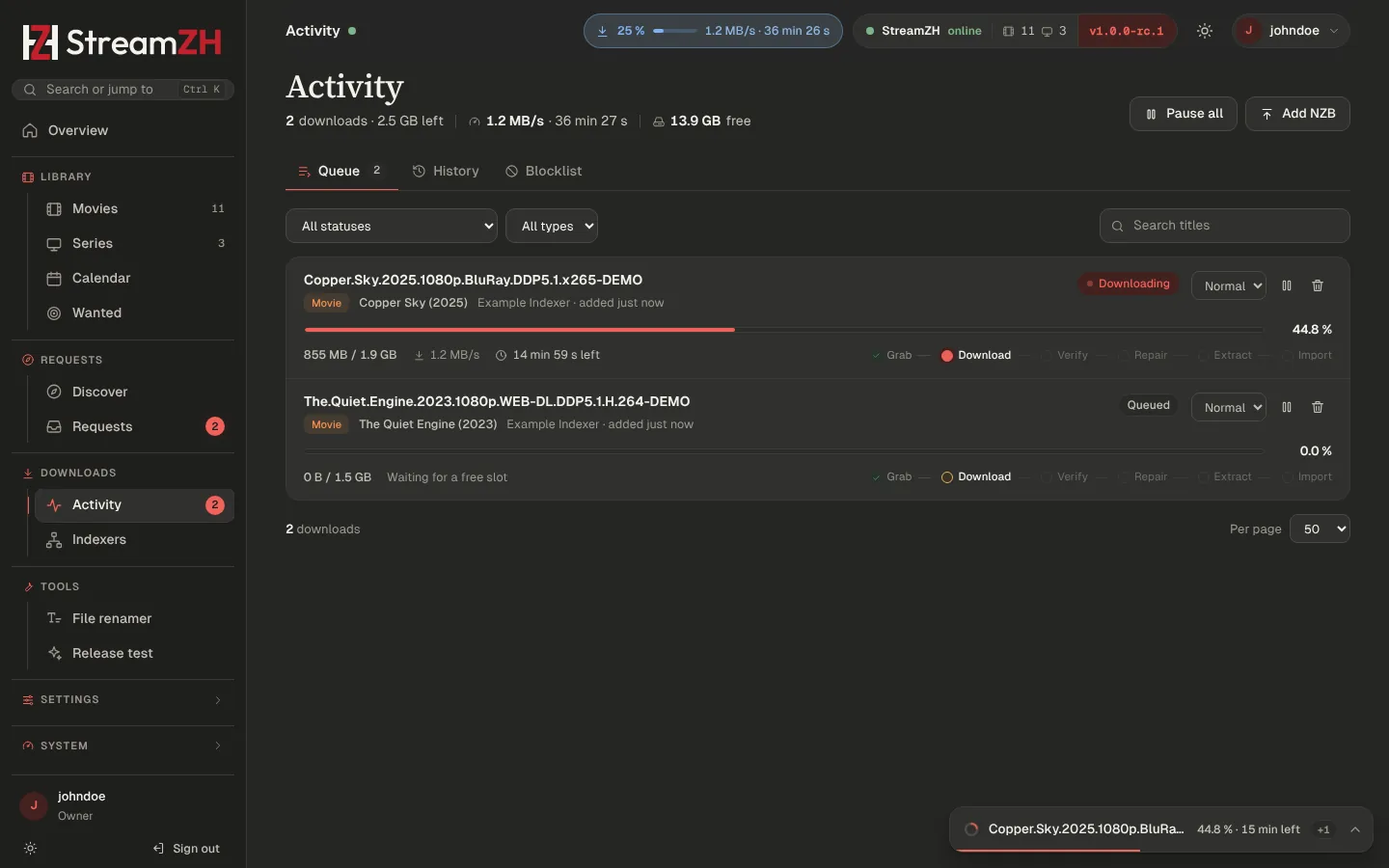
Activity (sidebar) follows every download.
- Queue: each download with a pipeline strip (Grab → Download → Verify → Repair → Extract → Import), progress, speed and time left. Pause and resume one or all, change the priority, remove (optionally with the downloaded files), retry a failed one. Add NZB downloads an NZB file you have; it is not linked to a movie or series. Torrents show seeders and peers.
- Import… on a finished download that is not linked to a movie or series (or did not import): choose where it belongs; it is moved into the library and renamed like an automatic import.
- History: Downloads (completed and failed, with their folder or the reason) and Events (every grab, download, import, upgrade, rename and deleted file), with filters and paging.
- Blocklist: releases that failed and are not grabbed again (Searching).
The top bar, the status window (bottom right) and the Windows tray icon show the downloads too: count, percent and time left.
Completed and failed download handling#
Settings → Media Management → Completed and failed downloads:
- Completed download handling (default on): finished downloads are imported automatically. Off: use Import… in Activity.
- Redownload failed (default on): a failed release goes on the blocklist and StreamZH searches for another one.
- Remove completed downloads and Remove failed downloads (Advanced) keep Activity tidy.