Guide
Quality
On this page
Which release StreamZH grabs, and when it replaces a file with a better one, is decided by four things:
| Where | What |
|---|---|
| Settings → Profiles | Quality profiles: allowed qualities, cutoff, language, custom format scores. Also the TRaSH Guides |
| Settings → Custom formats | Conditions on release names, groups, languages, sources, sizes … that profiles score |
| Settings → Quality | Size limits per quality |
| Settings → Indexers → Release profiles | Words a release must, must not or should contain |
Quality profiles#
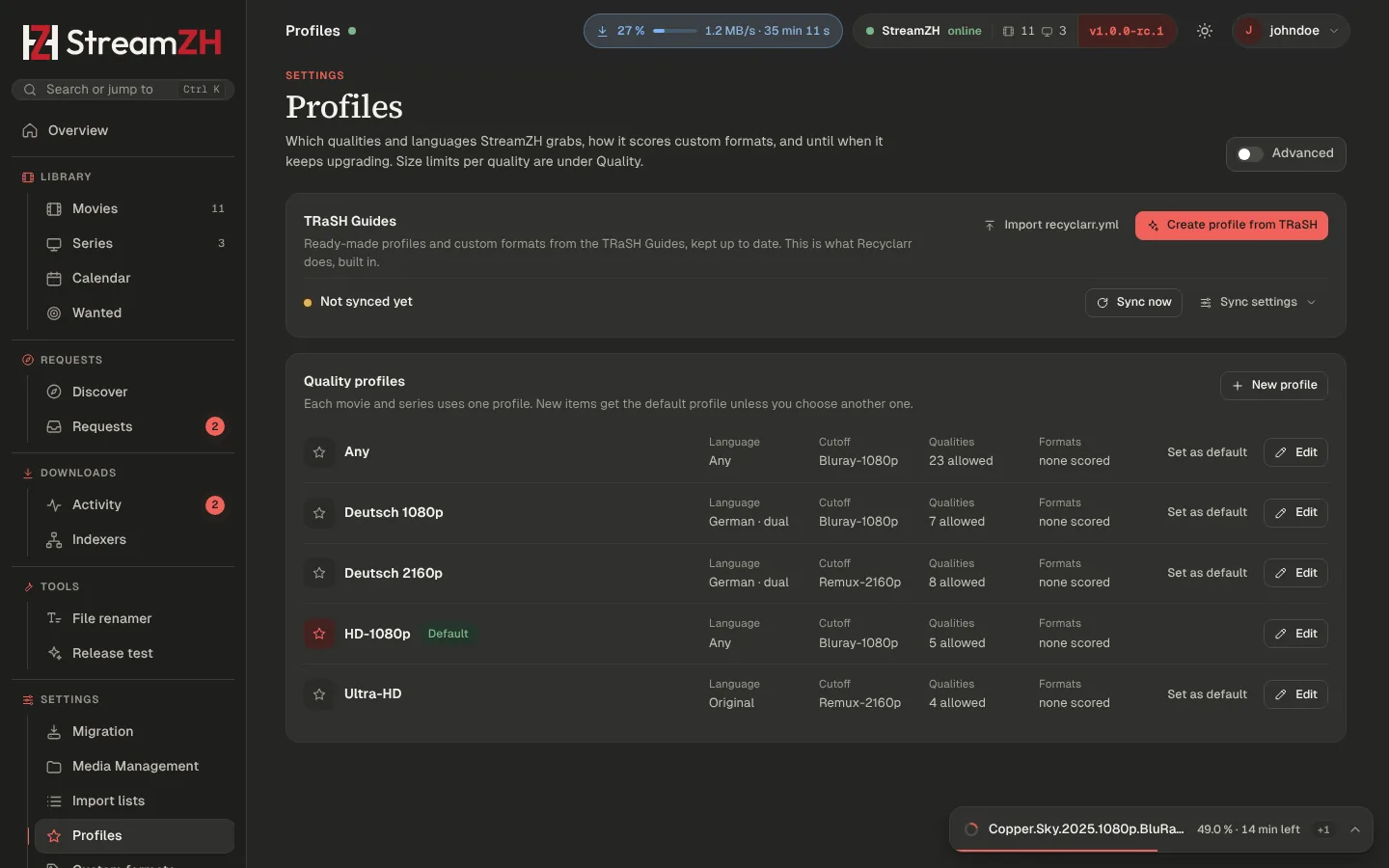
Each movie and series uses one profile; new items get the default profile unless you choose another. A new installation has Any, HD-1080p (the default, any language), Ultra-HD, Deutsch 1080p and Deutsch 2160p. The release language step of Get started switches the default to HD-1080p in the original language or to Deutsch 1080p (German, dual language preferred). Installations from before 1.0 keep their profiles and their default. Set as default changes the default; New profile creates one.
| Part | Meaning |
|---|---|
| Name | |
| Language | The language releases must have: a language, Original language (the movie's or series' own) or Any language |
| Prefer dual language | Prefer releases with two audio languages (e.g. German.DL) |
| Qualities, best first | Tick the allowed qualities and move them up or down. Select two or more and group them: grouped qualities rank equally and the custom format score decides (e.g. "WEB 1080p" for WEBDL and WEBRip) |
| Upgrades allowed | Replace a file with a better release |
| Upgrade until (cutoff) | Once a file has this quality, StreamZH stops looking for better releases |
| Custom formats | A score per custom format (separate lists for movies and series) |
| Minimum score | Releases below this custom format score are not grabbed |
| Upgrade until score | Stop upgrading at the cutoff quality once a file has this score. 0: quality only |
| Minimum upgrade step | An upgrade of the same quality must raise the score by at least this much |
A file below the cutoff, in the wrong language or below the Upgrade until score shows under Wanted → Cutoff unmet.
Size limits#
Settings → Quality: minimum, preferred and maximum size per quality, in MB per minute of runtime. Releases outside the limits are skipped; among equal releases StreamZH prefers the size closest to the preferred value. Leave maximum or preferred empty for no limit. The defaults are Radarr's. A TRaSH template can replace them with the guides' values.
Custom formats#
A custom format is a set of conditions. Profiles give each format a score; the scores of all formats that match a release are added up, and the best-scored release wins (after quality).
Condition types: release title (regular expression), release group, edition, language, source, resolution, quality modifier, release type (series: single episode, season pack …), indexer flags (freeleech, internal …), size and year. Each condition can be negated (counts when it does not match) and required. A format applies when every required condition matches and at least one condition of each type matches.
- New format opens the editor with a live test against release names.
- Import takes the JSON of one format or a list: a Radarr or Sonarr export or a file from the TRaSH Guides. Formats with the same name or TRaSH id are updated. Export (on a format) gives JSON that Radarr and Sonarr can import as it is.
- The naming token
{Custom Formats}puts matching formats into file names.
TRaSH Guides#
The TRaSH Guides publish tested profiles and custom formats. StreamZH has what Recyclarr does built in (Settings → Profiles → TRaSH Guides):
- Use the TRaSH Guides (on by default) downloads the guides and offers their templates.
- Create profile from TRaSH: pick a movie template (and optionally a series template), for example a German 1080p profile. It sets the qualities, adds the custom formats it needs with their scores, and optionally replaces the quality sizes and the naming formats.
- Update automatically: formats and profiles made from a template follow the guides after each sync (every 24 hours by default). Keep my score changes: scores you changed by hand stay.
- Import recyclarr.yml: paste your Recyclarr configuration; StreamZH reads the quality profiles, templates, custom formats and score overrides of every Radarr and Sonarr instance in it. Nothing changes until you apply.
- Repository and Branch (Advanced): use your own fork of the guides.
A profile made from a template marks scores that differ from the template and can be reset to them.
Release profiles#
Settings → Indexers → Release profiles: simple word rules on top of custom formats (like Sonarr's release profiles).
| Field | Meaning |
|---|---|
| Must contain | The release must contain at least one of these terms. Plain text ignores case; /regex/ is case-sensitive, /regex/i is not |
| Must not contain | The release is rejected when it contains any of these terms |
| Preferred | Terms with a score. The total ranks releases after quality and language, and can replace a file of the same quality when the profile allows upgrades |
| Indexers, Quality profiles | Where the profile applies. None selected: all |
Try it: the release test#
Tools → Release test: paste a release name, optionally choose a movie or series, and see how StreamZH reads it (quality, languages, group, edition, custom formats and scores) and whether it would grab it, and why not.